mod_development
Presents various tools for development.
After the development module is enabled a menu item System > Development is added in the admin.
On the development page it is possible to set debugging options, trace template compilation, and test dispatch rules.
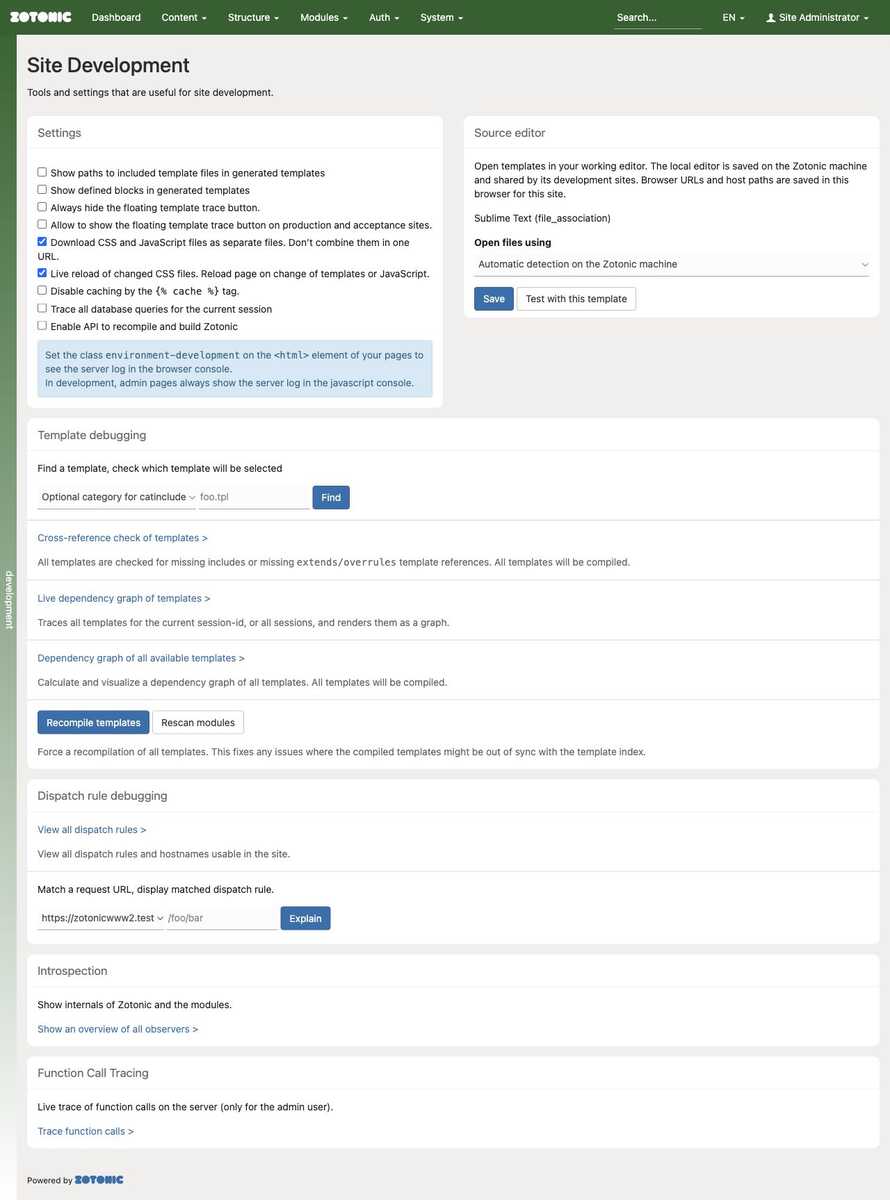
Debug Options
The settings column contains these development options:
Show paths to included template files. Add comments to generated templates showing the exact file included at each point.
Show defined blocks. Add comments marking the start and end of each
{% block %} ... {% endblock %}in generated templates.Always hide the floating template trace button. Hide the button in every environment. This takes precedence over the option to show it on production and acceptance sites.
Allow to show the floating template trace button on production and acceptance sites. Make the button available outside development and test environments. It is still shown only to users with permission to use
mod_development, and not on the development tools' own pages. In development and test it is available by default unless explicitly hidden.Download CSS and JavaScript as separate files. Generate separate
<link>and<script>tags for the files in a{% lib %}tag. This makes debugging easier, but increases the number of requests needed to load a page.Live reload of changed CSS files. Reload page on change of templates or JavaScript. Update styles in the browser when CSS changes, and reload the page when a template or JavaScript file changes. Enabling this checkbox also enables downloading CSS and JavaScript as separate files. The development tools' own pages do not automatically reload on template or JavaScript changes.
Disable caching by the
{% cache %}tag. Bypass template cache blocks while checking changes. This does not disable other caches, such as browser caching or application data caches.Trace all database queries for the current session. Enable database query tracing for requests in your session. This checkbox requires
mod_server_storage. Turn it off after investigating.Enable API to recompile and build Zotonic. Enable the development APIs, including
/api/model/development/get/recompilefor compilation and/api/model/development/get/flushfor flushing caches. These APIs do not require authentication when enabled; use this option only on trusted development installations.Show server log in the browser console. Start forwarding server logs to the current browser tab's developer console. Stopping it stops console logging for all connected logging tabs on the site. This option requires
mod_loggingand permission to receive client logs. In development, the checkbox is replaced by a notice: admin pages show these logs automatically, and site pages can opt in with theenvironment-developmentclass on their<html>element.
Open source file in editor
The second settings column configures opening templates in a source editor. This is either done by running a command to open a file, or by opening a browser URL. The editor can be chosen explicitly or detected automatically.
The local editor choice is stored in config.d/zotonic-editor.config under the
node configuration directory and shared by development sites and shell helpers.
Browser URL preferences and host-path mappings remain browser/site-specific.
Choosing automatic detection clears the explicit machine choice. Detection
uses trusted node configuration, ZOTONIC_EDITOR/VISUAL/EDITOR, inherited editor
sessions, file associations, running editors and installed launchers, in that
order. Ambiguous detection requires a choice. Local browser-triggered launches
require the development environment and the mod_development permission.
Containers only launch through browser URLs. Configure a browser editor preset or custom URL and map the container source root to the host checkout root. Sublime and Vim URLs need an installed host-side protocol handler.
In the Erlang shell use z:edit(mod_foobar), z:edit(mod_foobar, function_name),
z:edit(StackTrace) or z:edit(<<"path/to/template.tpl">>, 42). Library and
template names are resolved across running sites; ambiguous names require a
full path.
A trusted zotonic configuration development_editor can contain an executable and
argument list, for example:
{"code", ["--reuse-window", "--goto", "{file}:{line}:{column}"]}
Set the zotonic configuration development_editor_browser_only to true to
force browser launches on a remote host or a container that cannot be detected
automatically.
Node configuration
These settings belong to the global zotonic configuration,
(so not to a site's configuration or the module configuration):
| Setting | Default | Purpose |
|---|---|---|
development_editor | undefined | Trusted {Executable, Args} command. When set, takes precedence over editor environment variables during automatic detection. |
development_editor_id | <<"auto">> | Saved candidate ID. An explicit ID overrides automatic selection; an unavailable choice is reported instead of silently falling back. |
development_editor_browser_only | false | Disables local discovery and launching, including shell helpers. Containers enforce this behavior regardless of the setting. |
For example, a node configuration fragment can contain:
[{zotonic, [
    {development_editor, {"code", ["--reuse-window", "--goto", "{file}:{line}:{column}"]}}
]}].
The executable can be a name on PATH or an absolute path. Executable paths and
arguments accept strings or UTF-8 binaries. Each list element is one argument;
paths with spaces do not need embedded shell quotes. {file}, {line} and
{column} are replaced within arguments, with positions starting at 1. When no
argument contains {file}, the filename is appended. Commands are executed
without a shell: shell variables, pipelines and command substitutions are not
expanded. Terminal editors need a supported remote client or session.
Choose the local editor in Admin > Development to save development_editor_id
in config.d/zotonic-editor.config. The choice applies immediately and is loaded
again on restart. Automatic detection saves <<"auto">>; it does not remove a
custom development_editor command. Avoid defining the saved ID in multiple
configuration files. Use z_config_files:config_dir() in the Erlang shell to
find the node configuration directory; deployments can override it with
ZOTONIC_CONFIG_DIR. The generated file stores only the candidate ID.
Browser URL presets, custom URLs and source-root mappings are stored separately
in the browser for the site. They are not node configuration settings. In Docker,
map the source path inside the container to the corresponding checkout on the
host and install any required URL handler on that host. Shell helpers cannot
open the browser on the user's machine and return {error, browser_only}.
Language server (LSP) integration
The template language server provides editor support for .tpl files using a
running site's module and template indexes. It complements an Erlang language
server; it does not provide language services for .erl files.
Supported features include:
- Syntax diagnostics for unsaved templates, without compiling or rendering them.
- Go to definition for literal template references,
extendsandoverrules, including the next template in module priority order and symlinked sources. - Definitions for filters, models, scomps, actions and literal delegates at
their
event/2handler. - Hover information showing the reference type, site and matching source files, with symlinks resolved. Markdown formatting is used when the editor requests it; plain text remains available.
- Completion of template names, filters, models and built-in and custom tags.
Category includes list candidate templates: selecting the effective template requires a resource/category context. Formatting, rename and workspace references are not currently supported.
Model path completion
Completion after a model name follows literal m_get/3 path patterns and simple
literal alternatives in guards. Bracket expressions such as m.rsc[id].title
are treated as arguments without evaluating them. Suggestions also include common
and computed resource properties, request keys from m_req, declared module
configuration keys, and system keys from z_config. Configuration values are
never fetched. Predicate names are suggested only with an explicitly selected site.
Static descriptions are cached by the loaded module checksum and refreshed after
code reload. Models with dynamic paths or returned maps can supplement inferred
paths with a model_paths attribute. Use binary keys and any for an argument:
-model_paths([
    #{path => [<<"result">>, any, <<"title">>],
      description => <<"Title of the selected result.">>}
]).
This describes m.example.result[id].title. Metadata describes names and optional
plain-text documentation only; the language server never calls m_get/3 to
probe a path. Arbitrary helper calls, runtime map fields and resource-specific
custom properties are not inferred. Missing debug information falls back to the
available source file; paths without either source are omitted.
Start and select a site
Compile and start Zotonic, and enable mod_development on the desired site.
Configure the editor to start this stdio command:
/absolute/path/to/zotonic/bin/zotonic-lsp
This launcher requires Python 3 on the editor host. It probes the local node
first, then checks running Docker containers and infers source path mappings
from bind mounts. Multiple matching containers require an explicit
--container NAME. Discovery runs only at startup; the launcher replaces
itself with the selected process and adds no ongoing proxy. Use
bin/zotonic lsp directly to skip discovery and connect to the local node.
Semantic lookups use the selected site when one is configured. Otherwise, filters, models and delegates are resolved across running development sites. Template references first use sites containing the current file; if no target is found, other running development sites are tried. Matching source locations and template priority orders are accepted without selecting a site. Conflicting targets still require an explicit choice. Completion combines suggestions from candidate sites, and syntax diagnostics do not require a site selection.
Editor setup
The VS Code client is in
apps/zotonic_mod_development/priv/editors/vscode. Run npm ci there and load
it with VS Code's --extensionDevelopmentPath option, or package and install
it as a VSIX. Configure automatic runtime selection with:
{
    "zotonic.command": "/absolute/path/to/zotonic/bin/zotonic-lsp",
    "zotonic.args": [],
    "zotonic.site": "mysite"
}
Use Zotonic: Select Site or the status-bar item to save a site choice in the workspace. Zotonic: Restart Language Server reconnects after a node restart. The extension runs only in trusted workspaces.
For Sublime Text, install the LSP package and copy the supplied
apps/zotonic_mod_development/priv/editors/sublime/Zotonic.sublime-syntax into Packages/User. Configure the
server with command set to ["/absolute/path/to/zotonic/bin/zotonic-lsp"],
selector set to text.html.zotonic, and the desired site in
initialization_options.site and settings.zotonic.site. An example server
configuration is included beside the syntax file.
The transport connects through the existing Erlang cookie and node environment;
it is a trusted developer tool, not an HTTP API. For containers, the editor
continues editing host files while the language server runs inside the
container. Explicit pathMappings can handle source mounts that cannot be
inferred automatically. LSP settings belong to the editor workspace, separately
from the source-editor launch settings on the admin page.
See the language-server setup guide for complete editor configurations, Docker commands, path mappings, protocol limits and verification instructions.
Template debugging
The template selection mechanism is quite complicated. It takes into account all modules, their priority, the user-agent class (desktop, tablet, phone or text) and optionally the category of a resource.
With this debugging tool you can optionally select a category, and fill in the name of the template. Per user-agent class the selected template will be shown.
The second debug option is a page with a live display of all templates being compiled. With this it is possible to get greater insight in the template selection and compilation.
Dispatch rule debugging
With this it is possible to see for a request path which dispatch rules are matched and/or how it is rewritten.
Function call tracing
The function tracing tool allows you to trace calls to a specific function in a module. You can specify the module name, function name and the number of calls to trace. The output will be sent to the page that started the trace, via MQTT.
Function tracing can be enabled or disabled in the zotonic.config file. Per default it is enabled for the development and test environments. You can enable it runtime using:
bin/zotonic setconfig zotonic function_tracing_enabled true
Or disable it with:
bin/zotonic setconfig zotonic function_tracing_enabled false
In dispatch rules it is possible to protect certain requests from being traced. This is done by adding the
dispatch rule option sensitive. This option is set for the authentication requests. On development
environments this dispatch option is ignored.
Automatic recompilation
Note
The system can only scan for changed files if either inotify-tools or fswatch is installed.
The core Zotonic system starts either inotify-tools or fswatch, depending on which one is available. You have to
install one of these to enable auto-compile and auto-load of changed files.
See below for platform-specific installation instructions.
If a changed file is detected then Zotonic will:
- If an .erl file changes then the file is recompiled.
- If a .scss or .sass file changes then
sasscis called to compile it to its .css equivalent. If the changed.sassfile starts with a_then all.sassfiles without a_will be compiled. - If a .less file changes then
lesscis called to compile it to its .css equivalent. - If a .coffee file changes then
coffeeis called to compile it to its .js equivalent. - If a lib file changes then the module indexer will be called so that any removed or added templates will be handled correctly.
- If a template file changes then the module indexer will be called so that any removed or added template will be handled correctly.
- If a dispatch file changes then all dispatch rules are reloaded.
- If a beam file changes then the module will be loaded. If the beam file is a Zotonic module then it will be automatically restarted if either the function exports or the
mod_schemachanged. - If the .yrl definition of the template parser changes, then the .erl version of the parser is regenerated. (This will trigger a compile, which triggers a beam load).
Linux installation
On Linux this feature depends on the inotifywait tool, which is part of the inotify-tools package. For displaying
notifications, it uses notify-send:
sudo apt-get install inotify-tools libnotify-bin
macOS installation
On macOS we use the external programs fswatch and terminal-notifier:
sudo brew install fswatch
sudo brew install terminal-notifier
Accepted Events
This module handles the following notifier callbacks:
observe_admin_menu: Add development/debug entries to the admin menu.observe_filewatcher: Catch filewatcher file change events, reloads css or the open pages usingm_config:get_value.observe_request_context: Copy the database trace flag to a new (fresh) request process usingz_development_dbtrace:copy_from_session.
Delegate callbacks:
event/2withpostbackmessages:log_client_enable,template_debug_enable,template_graph,template_trace_fetch,template_trace_path,template_trace_start,template_trace_stop,template_view,template_xref_check.event/2withsubmitmessages:function_trace.